AI 101Beginner11 min read

Grok Bot 101: Your First AI Agent in 20 Minutes

New to AI agents? Create your first Grok Bot in 20 minutes with no code — learn the create → brief → run → review loop, and the safe habits to grow from here.

Grok Bot 101: Your First AI Agent in 20 Minutes

Overview

Everyone's talking about "AI agents," but most people have never actually made one. Grok Bot — xAI's agent platform — is one of the friendliest places to start, because creating your first agent takes about 20 minutes and doesn't require any code. This guide walks you through it gently and safely: you'll create a bot, give it a job, and learn the one simple loop that every agent workflow follows — while keeping the risky stuff firmly under human control.


Grok Bot 101: create your first AI agent, give it a safe goal, and review its work — no code required.


Difficulty: Easy — beginner, no code · You'll need: an X / SpaceXAI account with Grok Bot access · Cost: free tier available · Updated: September 2026

What Grok Bot Actually Is

An ordinary chatbot answers you and stops. An agent can take a goal and carry out multiple steps to reach it — searching, reading, drafting, organizing — across the tools you use. That's Grok Bot: in xAI's own words, "your team of extraordinarily capable AI agents." You create a bot, teach it your style, give it a goal, and it takes on real work, and several bots can run at once.
Grok Bot is xAI's agent platform — "create a bot, give it a goal, and it works across the apps you already use."

The important beginner insight: an agent is powerful because it can act — which is exactly why you start it on tasks where a mistake is harmless.

Who This Is For

  • Anyone AI-curious who wants to move from "chatting with AI" to "having AI do a task."
  • Busy professionals who want a safe, 20-minute first project before trusting agents with anything real.
  • Future power users who want the right habits from day one.
  • The One Loop to Learn

    Every agent workflow — beginner or advanced — is the same four-step loop. Learn this and everything else is detail:
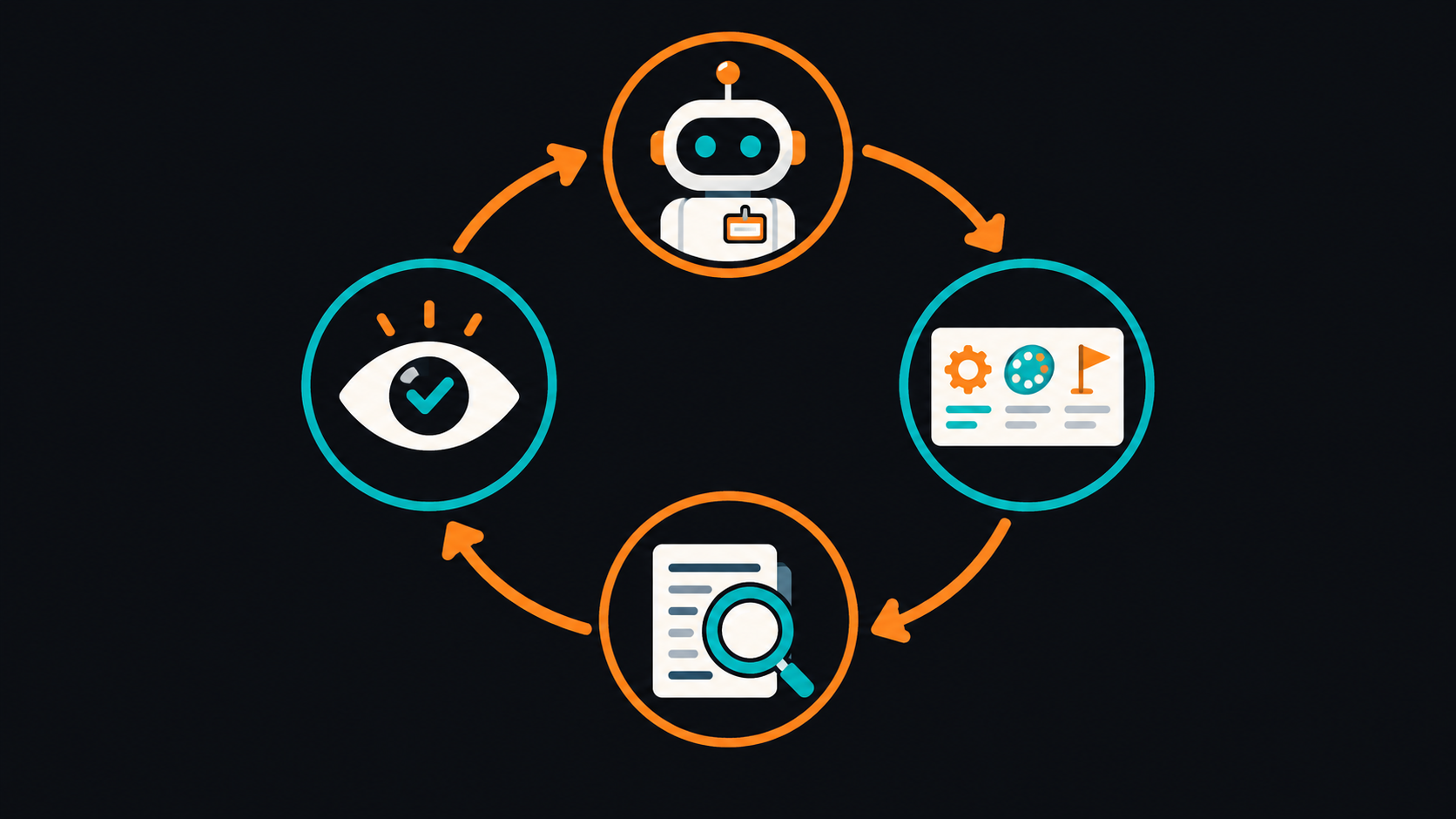
    The loop behind every agent: create a bot → brief it (name, style, goal) → it runs a safe task → you review.
    The loop behind every agent: create a bot → brief it (name, style, goal) → it runs a safe task → you review.

    1. Create a bot.
    2. Brief it — a name, your style, and a clear goal.
    3. Run — it does the work.
    4. Review — you check the result before anything leaves your hands.

    Make Your First Agent (Step by Step)

    Step 1: Get access

    Go to x.ai (or grok.com), sign in with your X / SpaceXAI account, and open Grok Bot. The free tier is enough to learn on.

    Step 2: Create and name a bot

    Create a new bot and give it a clear identity — e.g. "Research Buddy." Teach it a little about how you like things: "Be concise, use plain English, always include source links."

    Step 3: Give it a SAFE, read-only goal

    This is the most important step for a beginner. Start with a task where a wrong answer costs nothing — research or summarizing, never sending or spending:
    
    Research the top 3 free tools for [your task]. For each, give a
    one-line summary, who it's best for, and a source link. Don't make
    anything up — if you're unsure, say so.
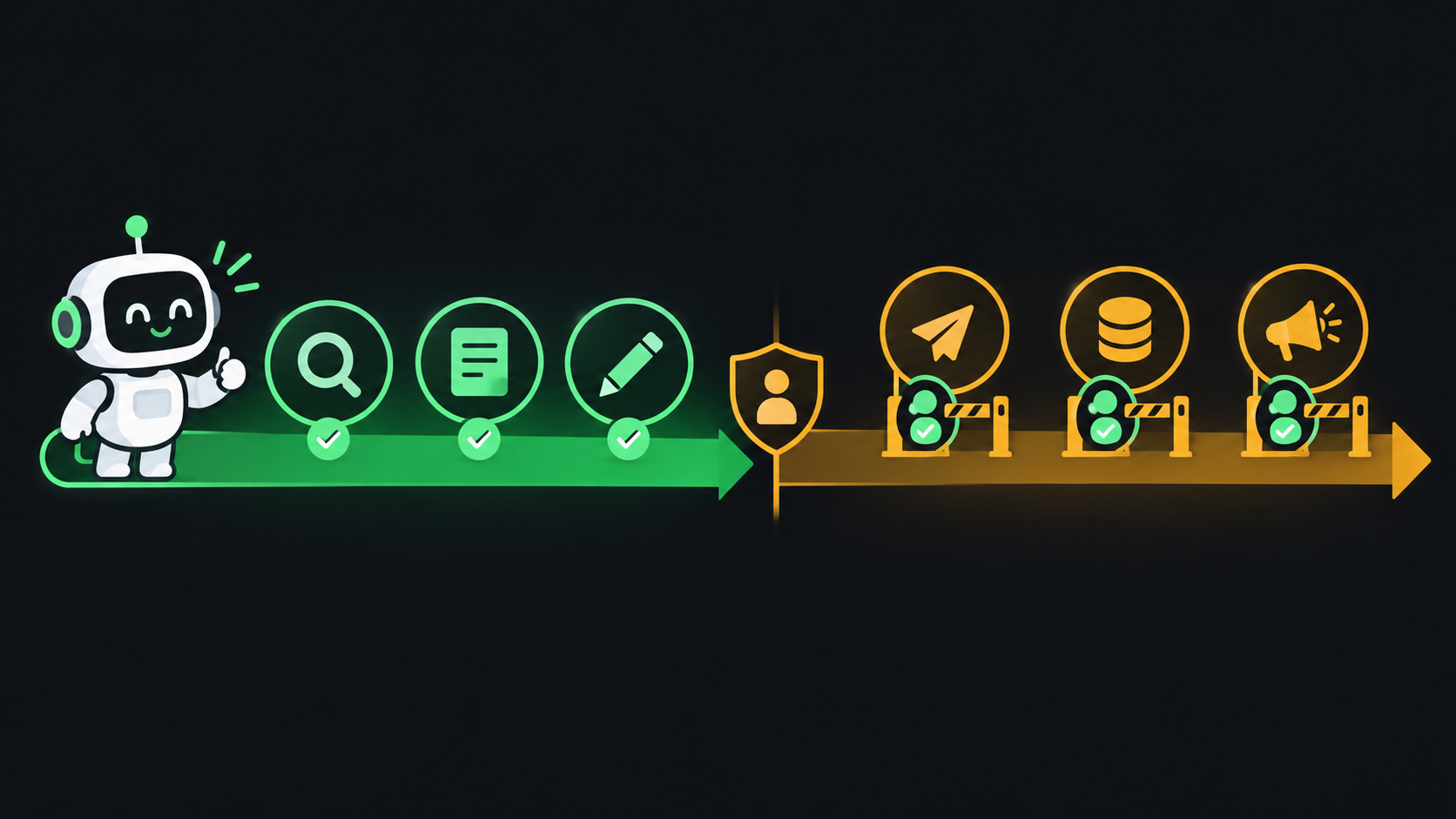
    
    Start in the safe zone: research, summarize, and draft are low-risk. Sending, spending, and publishing need human approval.
    Start in the safe zone: research, summarize, and draft are low-risk. Sending, spending, and publishing need human approval.

    Step 4: Watch it work, then review

    Let the agent run and read the result critically. Did it follow your style? Are the sources real? This review step is a habit, not a formality — it's what makes agents safe to use.

    Step 5: Level up gradually

    Once you trust it on research, try a slightly bigger job — drafting a post or email (still just a draft you review). Only much later, and carefully, connect it to apps that can act on your behalf.

    The Golden Rule for Beginners


    Common Mistakes to Avoid


  • Starting with a risky task. Don't make your first agent one that emails clients or spends money. Start read-only.

  • Not reviewing the output. Agents can be confidently wrong. Read every result, especially early on.

  • Vague goals. "Help with marketing" gives mush. "Research 3 tools and summarize with links" gives gold.

  • Chasing the wrong site. It's Grok Bot via x.ai / grok.com, not "grokbot.ai."
  • Pro Tips

  • Give it a clear identity. A named bot with a short style note produces far more consistent work.
  • Ask it to flag uncertainty. End goals with "if you're unsure, say so" to cut down on made-up answers.
  • Keep a "safe tasks" list. Research, summarize, draft, organize, compare — great first jobs.
  • One bot, one job. A focused "Research Buddy" beats a vague do-everything bot.
  • Graduate slowly. Move from read-only → drafts-you-review → connected actions, one careful step at a time.
  • Key Takeaways

  • Grok Bot is xAI's agent platform (via x.ai / grok.com) — you create bots that do tasks, not just chat. It's not "grokbot.ai."
  • Every agent follows one loop: create → brief → run → review.
  • Start read-only — research and summaries — where mistakes are harmless.
  • A human approves anything that sends, spends, or publishes — always.
  • Grow gradually from safe tasks to bigger ones as your trust (and your review habit) develops.
  • Grok Bot (xAI)

    xAI's AI-agent platform — create your first bot and give it a goal. Requires an X / SpaceXAI account; free tier available.

    x.ai
    Grok — the AI assistant behind it

    xAI's chatbot that powers Grok Bot's agents. A good place to practice prompting before you set an agent loose on a task.

    grok.com

    Sources: Grok Bot (x.ai) · Grok

    Grok Bot is evolving quickly; verify features and access on xAI's official pages. Always review AI output, and keep a human in control of anything that sends, spends, or publishes.

    Learn AI, after work

    Track your progress, earn XP, and unlock more free tutorials in the AfterWork Bytes app.

    Open this tutorial in the app

    More AI tutorials