AI 101Beginner12 min read

Claude Academy: Anthropic's Free AI School (and How to Use It)

Claude Academy is Anthropic's free, official school for using AI well — real courses, tutorials, and use cases from beginner to developer. Here's what's inside and a simple plan to get value in your first hour.

Claude Academy: Anthropic's Free AI School (and How to Use It)

Overview

Most people learn AI by trial and error — random YouTube videos, half-remembered tips, and a lot of guessing. There's now a better starting point: Claude Academy, Anthropic's own free learning platform at academy.claude.com. It's a genuine, structured school for using AI well — "learn to use AI safely, effectively, and with intention," in their words — made by the same team that builds Claude.

The best part: it's free, it's beginner-friendly, and it isn't a disguised sales funnel. This guide shows you what's actually there, who each part is for, and a simple path to get real value in your first hour.

Claude Academy is Anthropic's free, structured school for using AI well — courses, tutorials, and use cases, from beginner to developer.


Difficulty: Easy — no experience needed · You'll need: an email address and a browser · Cost: free · Updated: September 2026

What Claude Academy Actually Is

Claude Academy is Anthropic's official education site — a library of free courses, tutorials, and use cases for learning to work and build with Claude. It's not a blog and not a trial: courses are real, self-paced lessons (often with a short quiz), and the catalog is large — by late August 2026 it held hundreds of resources (around 22 courses plus a long list of tutorials, use cases, and webinars), and it keeps growing.
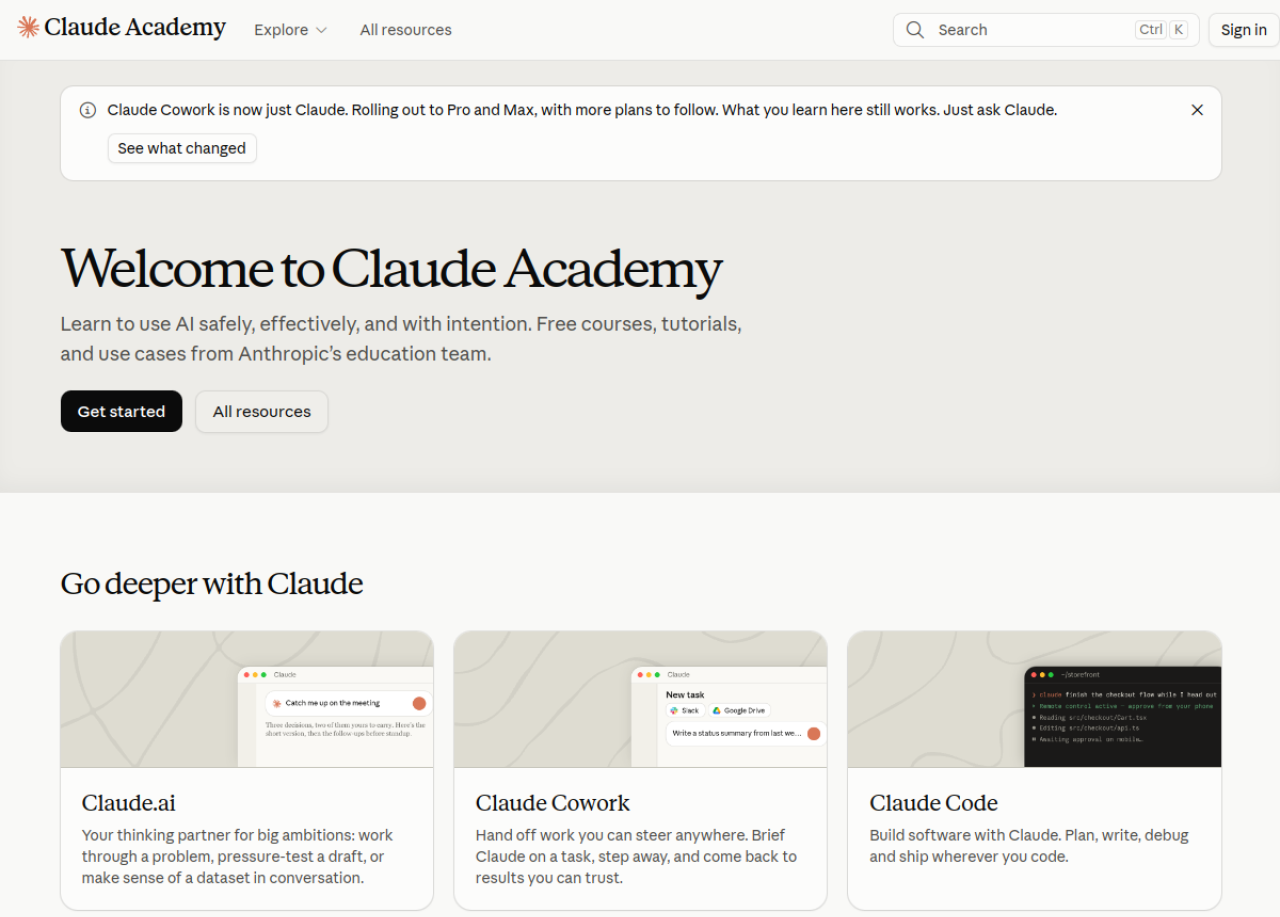
The real Claude Academy homepage — "Learn to use AI safely, effectively, and with intention. Free courses, tutorials, and use cases from Anthropic's education team."

Because it's made by Anthropic, it stays current with the actual products — and it's candid about change. A banner on the site right now even notes that "Claude Cowork is now just Claude", reassuring learners that what they learn still applies. That honesty is a good sign of a resource that's maintained, not abandoned.


Who It's For (Three Kinds of Learner)

The Academy is organized so you can start wherever you are. Broadly, there are three tracks:

Claude Academy meets you at your level: brand-new to AI, getting productive at everyday work, or a developer building on Claude.
  • New to AI — start with the foundations: how AI thinks, what it's good and bad at, and how to work with it deliberately.
  • Getting productive with Claude — practical, everyday use: drafting, analyzing, summarizing, and handing off tasks in Claude.ai and Claude Cowork (now folding into just "Claude").
  • Developers — building on Claude Code, the Claude Platform (the API), and the Model Context Protocol (MCP), plus Claude Tag for using Claude inside Slack.
  • You don't have to pick a lane forever — most people start with the foundations, then branch into whichever product fits their work.

    The Best Place to Start: AI Fluency

    If you're not sure where to begin, begin here. Claude Academy's standout foundational collection is AI Fluency — courses about the mindset and mental models for working with AI, not just button-clicking. Two real, beginner-friendly courses:

  • "AI Fluency: Framework and foundations" — ~14 lessons and a quiz, around 4 hours. The core mental models for collaborating with AI.
  • "AI capabilities and limitations" — ~13 lessons, around 3.5 hours. What AI can genuinely do, and — just as important — where it falls short.
  • There's also a shorter, newer one, "Building effective human-agent teams (beta)" (~5 lessons, ~45 minutes), for when you're ready to hand real tasks to an AI agent. Start with Framework and foundations; it makes everything else click.

    A Simple First-Hour Plan

    A simple path: start with the foundations, pick the tool that matches your work, practice with a real use case, and finish a course.
    A simple path: start with the foundations, pick the tool that matches your work, practice with a real use case, and finish a course.

    Step 1: Sign in (free)

    Go to academy.claude.com and click Sign in (top right). An email is all you need — no subscription, no credit card. Signing in lets the site remember your progress across lessons.

    Step 2: Browse "All resources" or "Explore"

    Use the Explore menu or All resources to see the full catalog. You can filter by product (Claude.ai, Claude Code, and so on) and by type (course, tutorial, use case). The search box (Ctrl/⌘ + K) is the fastest way to jump to a topic.

    Step 3: Take one foundation lesson

    Open AI Fluency: Framework and foundations and complete the first lesson or two. Don't binge — one solid concept you actually use beats five you forget.

    Step 4: Pick the tool that matches your work

    Then jump to a product path: Claude.ai if you mostly chat and write, Claude Code if you build software, Claude Tag if your team lives in Slack.

    Step 5: Apply it with a real "use case"

    The Academy's use cases are short, task-shaped guides ("do X with Claude"). Pick one close to your actual job — a report, an analysis, an email workflow — and do it on something real today. That's where learning turns into results.

    How to Actually Get Value (Not Just Watch)

    The difference between "I watched some AI courses" and "AI changed how I work" is application. A few habits that make it stick:

  • Learn one thing, then use it the same day on real work. Momentum comes from a small win, not a finished playlist.
  • Keep Claude open in a second tab while you learn, and try each technique immediately.
  • Follow the use cases, not just the courses. They're built around outcomes, which is what you actually want.
  • Common Mistakes to Avoid


  • Skipping the foundations. Jumping straight to advanced product features without AI Fluency is why a lot of people find AI "unpredictable." The mental models are the point.

  • Collecting courses instead of finishing one. Enrolling in ten and completing none is the most common trap. Finish one, apply it, then move on.

  • Learning without doing. Watching a lesson isn't a skill. Do the exercises and use the technique on real work.

  • Assuming the product names are fixed. They change (Cowork → Claude). Learn the underlying skill and you're future-proof.
  • Pro Tips

  • Start with "AI capabilities and limitations." Knowing where AI fails saves you from the mistakes that make beginners give up.
  • Use search (Ctrl/⌘ + K) to jump straight to your job — "spreadsheet," "email," "summarize," "code review."
  • Pair a course with a use case. The course teaches the idea; the use case gives you the reps.
  • Bookmark your path. Sign in so your progress is saved, and return in short, regular sessions rather than one marathon.
  • Bring your own task. The fastest learning is applying a lesson to a problem you already have on your plate.
  • Key Takeaways

  • Claude Academy (academy.claude.com) is Anthropic's free, official school for using AI well — real courses, tutorials, and use cases, beginner to developer.
  • It's genuinely free — just an email — and not a sales funnel.
  • Start with AI Fluency (Framework and foundations, then capabilities and limitations) before diving into any product.
  • Three tracks: new to AI, everyday productivity (Claude.ai / Claude), and developers (Claude Code, Platform/API, MCP, Claude Tag).
  • Value comes from application — learn one thing and use it on real work the same day.
  • Claude Academy — free courses from Anthropic

    Anthropic's official learning platform: free courses, tutorials, and use cases for using and building with Claude, from beginner to developer.

    academy.claude.com
    Claude.ai — practice what you learn

    Open Claude in a second tab and try each technique the moment you learn it. Applying a lesson immediately is what makes it stick.

    claude.ai

    Sources: Claude Academy · Anthropic

    Claude Academy's catalog and product names evolve quickly; course lists and counts were accurate as of September 2026 — check the site for the latest.

    Learn AI, after work

    Track your progress, earn XP, and unlock more free tutorials in the AfterWork Bytes app.

    Open this tutorial in the app

    More AI tutorials